Showing posts with label Gadgets Review. Show all posts

Best Cameras To Give As Gifts For New Year 2013

Friday, 30 November 2012 | comments


Year after year cameras remain a popular item on people’s wish lists. With the numerous new models available, it can be hard for someone to know which one to get their budding photographer or the amateur who wants to take it to the next level. Here is a guide of the best cameras that make great gifts.


Best First Camera

The Samsung DV300F is the ideal choice for a camera under $150 for someone who wants their first attempt at photography. It has both a rear and front facing LCD screen, a 5x optical zoom for great closeups, and 16.0 megapixels. It includes a self-timer so the photographer can still be part of the action. This camera is perfect for a first-time user with no complicated settings or high price tag.


An Upgrade for the Pro


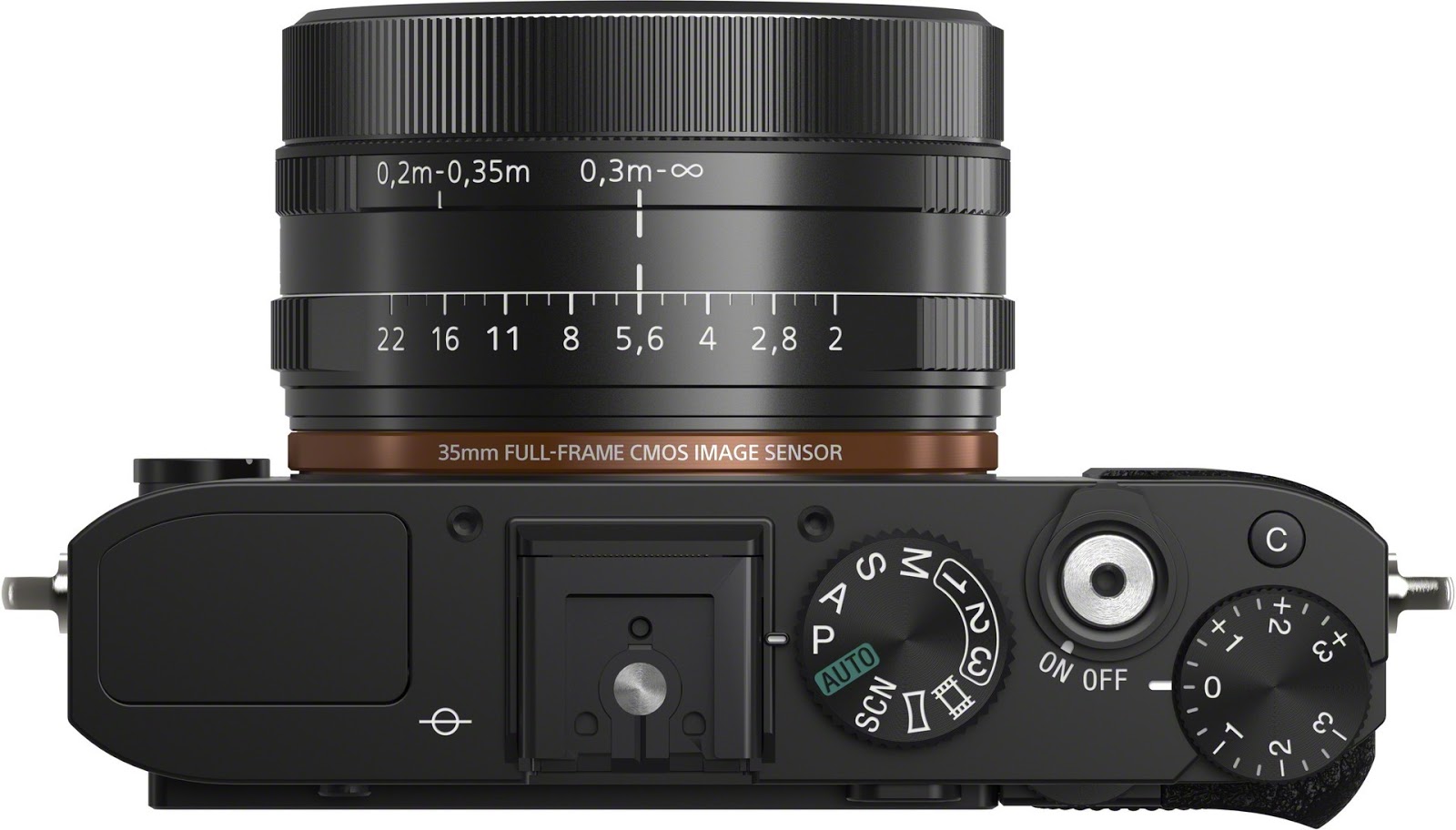
If you are buying a camera for someone who makes their living as a photographer, you will want to get only the best. The Sony DSC-RX1 meets that title with a high-quality lens for extreme clarity of the subject while blurring the background for amazing effects. This compact camera is easy to carry around while still providing the speed and quality that photographers want.

GOOGLE INTEGRATES DRIVE WITH GMAIL, ENABLES 10GB ATTACHMENTS

Thursday, 29 November 2012 | comments


Have you ever tried to attach a file to an email only to find out it's too large to send? Now with Drive, you can insert files up to 10GB -- 400 times larger than what you can send as a traditional attachment. Also, because you’re sending a file stored in the cloud, all your recipients will have access to the same, most-up-to-date version, he said.
Like a smart assistant, Gmail will also double-check that your recipients all have access to any files you’re sending. This works like Gmail’s forgotten attachment detector: whenever you send a file from Drive that isn’t shared with everyone, you’ll be prompted with the option to change the file’s sharing settings without leaving your email. It’ll even work with Drive links pasted directly into emails.

 So whether it’s photos from your recent camping trip, video footage from your brother’s wedding, or a presentation to your boss, all your stuff is easy to find and easy to share with Drive and Gmail. To get started, just click on the Drive icon while you're composing a message. Note that this feature is rolling out over the next few days and is only available with Gmail's new compose experience, so you'll need to opt-in if you haven't already.

Apple iTunes 11 review Software Complete reviews Good and Bad

| comments


The good: The iTunes 11 interface is easier to navigate and is more intuitive than previous versions. The mini player has the right set of controls to keep the software out of your way while you do other things.
The bad: The app still takes up a lot of your computer's resources. The Windows version still lags behind the Mac.
The bottom line: iTunes 11 is a much-needed refresh with a new interface and a useful mini player, but it's still a little overly complex for its own good.


Apple's iTunes 11 (Mac | Windows) is a complete makeover to Apple's media hub, simplifying the interface, adding more iCloud integration, and adding a new mini player. The design is intuitive and visually pleasing, but as the first rollout of the new version, there are still a few problems.

What we get now is a complete redesign without Ping, without the need for as much iOS device management (now that much of that is done with iCloud), and without many of the interface elements that were doing little more than taking up space. iTunes 11 is certainly a lot more streamlined visually over past versions, but this early version uses a lot of computer services. Hopefully Apple will follow up with a bug fix update to patch some of the more-troubling problems.

Still, there's little question iTunes needed a refresh, and Apple appears to be on the right path.

The full-screen desktop player
This is the first time iTunes has had a major change to the design scheme since its inception 12 years ago. As such, it will probably take some getting used to, but my initial reaction is positive.

When you open iTunes in the full window, the left-side navigation that housed your various media libraries from earlier versions is no longer the main interface to look at all your content. Now, you have only a drop-down menu on the left to pick the type of media, and buttons across the top to drill down in each category. All you see in the main window is content from that specific category. So if you choose Music from the drop-down menu, for example, the buttons across the top let you sort by songs, albums, artists, genres, videos, playlists, and radio. Below you'll see only content from your music collection. When you choose other media libraries, you get buttons across the top appropriate to that media type.


Copyright © 2012. DAILY NEWS BAY:Latest News Headlines,Online News on Cricket, - All Rights Reserved